Code, Commit, Conquer (Git & GitHub Essentials)
Theme: Code, Commit, Conquer
This week equips participants with the essential skills to manage their robotics projects using Git and GitHub. From version control basics to building a projects portfolio, students learn how to collaborate, track changes, and showcase their work.
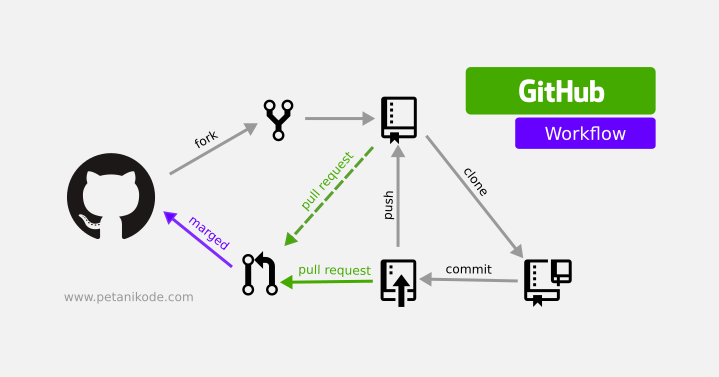
Focus
Understand the basics of Git: repositories, commits, branches, merges.
Learn how to use GitHub to host projects, track progress, and collaborate.
Set up GitHub repositories for workshop assignments.
Learn professional workflows used in open-source and industry projects.
Learning Flow
Theory - Why version control is critical in robotics and software engineering. - Git vs GitHub: local version control vs remote hosting. - Core concepts:
Repository (repo)
Staging area
Commits
Branching and merging
Pull requests
Practical / Code - Install Git and configure user identity. - Create a new local repository. - Track changes with git add, git commit, and git status. - Push a project to GitHub with git remote and git push. - Clone a repo and contribute changes. - Resolve basic merge conflicts. - Write meaningful commit messages.
Collaboration & Professional Practice - Forking and pull requests (PRs). - Using issues and GitHub Projects to track tasks. - Writing good READMEs and documentation. - Adding badges and visuals for presentation. - Importance of consistent commit history for career portfolios.
Assignment - Initialize a GitHub repository for your robotics workshop assignments. - Create at least:
5 meaningful commits
1 branch (feature branch) merged back into main
A well-structured README with project description and usage
Submit the repository link for review.
Takeaway
By the end of this week, students will not only understand how to use Git and GitHub effectively, but will also have the beginnings of a professional portfolio. Every assignment and project will contribute to their GitHub activity, creating a track record that is invaluable for both academic applications and career opportunities.